
The Home Office Design Challenge
Home offices have transitioned from occasional workspaces to permanent, integral zones in most households. Yet despite this prominence, many home offices remain visually compromised by the equipment required for professional work. Printers, scanner/copiers, and various technology peripherals occupy disproportionate visual real estate, creating an aesthetic tension between professional functionality and residential design sensibility.
Traditional office furniture—metal filing cabinets, plastic printer stands, industrial shelving—maintains harsh, utilitarian aesthetics fundamentally at odds with residential design principles. The result: home offices that feel temporary or uncomfortably commercial despite serving daily professional functions.
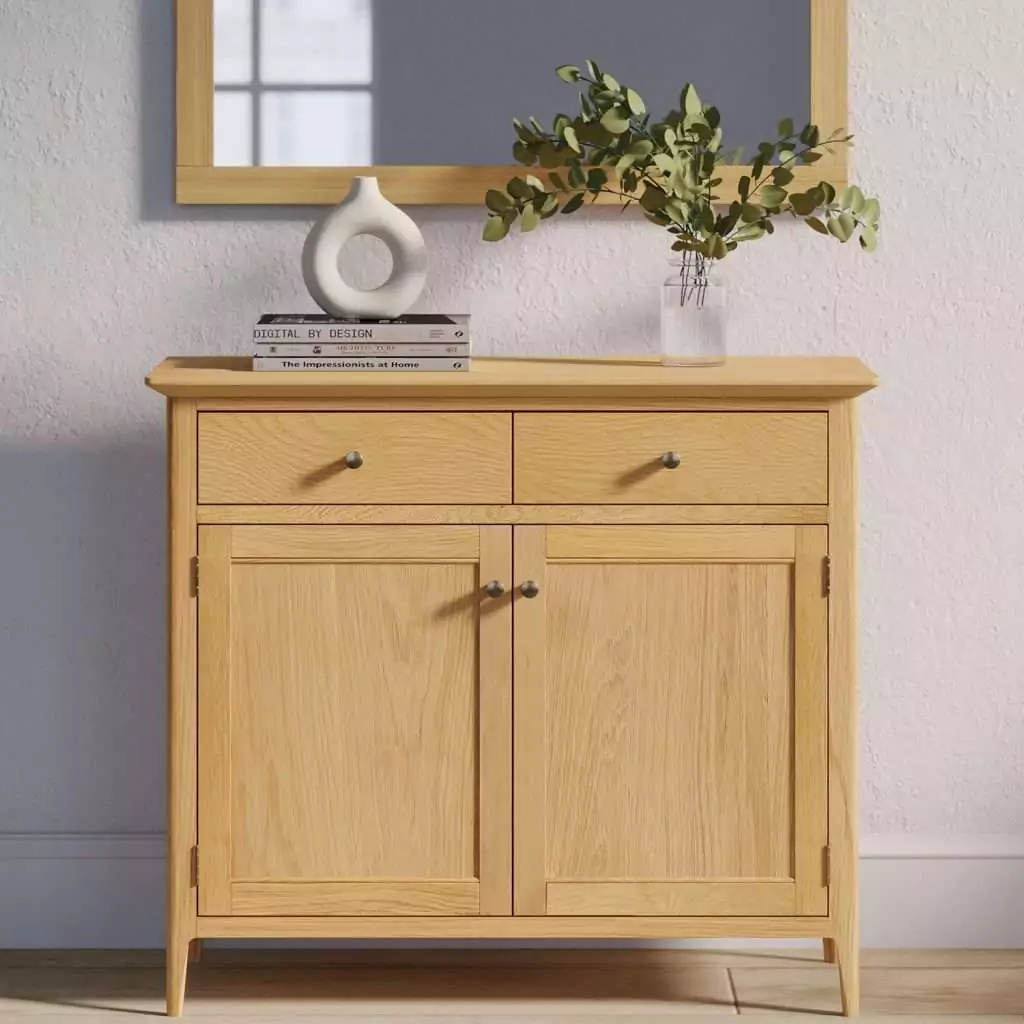
A mini oak sideboard solves this aesthetic and functional challenge elegantly. These compact pieces provide perfect proportions for concealing printers and office equipment while maintaining the warmth and sophistication that distinguishes residential from commercial design. Your home office transforms into a genuinely sophisticated workspace where equipment remains accessible yet visually discrete.
This guide explores comprehensive strategies for integrating a mini sideboard printer cabinet into home office design, examining aesthetic integration, functional optimization, and practical implementation strategies.
Part One: Understanding Printer Cabinet Requirements
Dimensional Compatibility
Before selecting a mini sideboard for printer cabinet duty, you must understand printer dimensions and spatial requirements.
Typical Printer Dimensions:
| Printer Type | Approximate Width | Approximate Depth | Approximate Height |
|---|---|---|---|
| Compact inkjet | 400-500mm | 200-250mm | 100-150mm |
| Standard all-in-one | 500-600mm | 300-400mm | 150-200mm |
| Large office multifunction | 600-800mm | 400-500mm | 200-300mm |
Mini Sideboard Interior Dimensions:
Quality mini sideboards typically provide:
- Interior width: 700-900mm
- Interior depth: 350-400mm (shelves)
- Interior height: 600-700mm (usable cabinet space)
Verification and Compatibility:
Your specific printer must physically fit within your sideboard’s interior dimensions. Before purchasing your sideboard, measure your printer’s exact dimensions. Consider not only the printer itself, but also necessary clearance for:
- Paper input tray positioning
- Output tray extension
- Cable routing
- Ventilation requirements (most printers require minimum airflow)
Ventilation and Heat Management
Printers generate heat during operation. Enclosed cabinet storage requires careful ventilation consideration to prevent thermal accumulation that might damage equipment or create fire hazards.
Ventilation Solutions:
- Cabinet venting: Drill carefully-placed holes in sideboard rear panels to allow airflow. Position holes above printer heat output to create natural convection
- Mesh backing: Retrofit mesh panels into cabinet rear to allow unrestricted airflow while maintaining visual discretion
- Strategic positioning: Position sideboard to allow air circulation around cabinet perimeter
- Timed operation: Ensure printer remains powered off between use to limit heat accumulation
Quality sideboard construction with solid wood backs provides superior ventilation compared to cheaper particle board alternatives. The natural wood’s material properties actually support modest airflow compared to sealed synthetic materials.
Part Two: Aesthetic Integration Strategies
The Transformation Principle
The fundamental principle underlying successful printer cabinet design involves rendering office equipment visually invisible. Rather than displaying printers as functional necessities, effective design hides them completely, preserving office aesthetic integrity.
Design Philosophy: Absence Rather Than Accommodation
Effective printer cabinets operate on the principle of aesthetic elimination. When visitors or video call participants observe your home office, they should notice:
- A sophisticated workspace
- Organized, curated aesthetic
- Professional atmosphere
- No visible office equipment
The printer remains functional but perceptually absent—hidden within cabinetry that maintains visual harmony with surrounding design.
Material and Finish Harmony
A mini oak sideboard’s finish must harmonize with existing office décor to achieve this invisibility principle.
Contemporary Office Aesthetics
In contemporary offices emphasizing clean lines and minimalism:
- Natural oak finish: Introduces warmth and organic texture contrasting with modern efficiency
- Painted finishes: White or soft gray painted oak provides contemporary aesthetic while maintaining warmth
- Mixed finishes: Painted base with natural oak top introduces subtle design interest without overwhelming minimalist principles
Traditional Office Aesthetics
In spaces drawing from classical or traditional design:
- Dark stain finishes: Deep mahogany or walnut-tone stains provide sophisticated grounding
- Natural honey oak: Warm golden tones complement traditional paneling and heritage décor
- Hand-painted finishes: Muted colors or faux-finishing techniques maintain period-appropriate aesthetic
Professional Eclectic Approach
In offices mixing traditional and contemporary elements:
- Natural finishes: The versatility of oak adapts to eclectic mixing
- Statement paint colors: Bold yet sophisticated colors (deep navy, sophisticated grey-green) establish personality while remaining professional
- Material contrast: Combining painted oak base with natural oak top creates visual interest without jarring aesthetic transitions
Positioning Within Office Layout
Strategic placement determines whether your printer cabinet integrates seamlessly or appears decorative yet functional.
Optimal Positioning Principles
- Secondary placement: Position your sideboard as a secondary furniture element rather than a primary focal point. Office desks should remain primary; the sideboard supports functionality without commanding attention.
- Wall placement: Position against walls rather than floating in room centers. This preserves floor space, creates visual boundaries, and makes the sideboard feel architecturally integrated rather than superficial.
- Perpendicular to desk: Position perpendicular to your primary work desk rather than directly behind it. This arrangement allows access without interrupting sightlines or creating visual clutter in your primary work zone.
- Auxiliary furniture anchoring: Position near secondary office furniture (filing, storage, or shelving). This creates a functional zone dedicated to equipment and supplies rather than having equipment appear arbitrarily placed.
- Lighting coordination: Position where office lighting illuminates the sideboard adequately when open but allows shadows to conceal interior contents when closed. This visual discretion maintains aesthetic control.
Part Three: Functional Organization Within the Cabinet
Maximizing Interior Organization
The interior organization of your printer cabinet determines accessibility, safety, and long-term equipment protection.
Internal Storage Zones
Primary Equipment Zone (Center Shelf)
Position your printer on the central shelf at a height allowing comfortable access without excessive bending or reaching. The central location distributes weight evenly across the shelf structure. Ensure adequate clearance above the printer for:
- Paper tray positioning
- Ink cartridge access
- Output tray extension
- Cable connections
Place a rubber mat beneath the printer to:
- Dampen vibration and noise
- Protect the sideboard finish from potential damage
- Prevent equipment sliding during cabinet opening/closing
Supply Storage (Upper Shelves)
Upper shelves accommodate printer supplies without competing for primary equipment space:
- Reams of paper in original packaging (prevents dust and moisture absorption)
- Extra ink cartridges in sealed containers
- Toner storage in secure cases
- Paper specialty stocks (cardstock, labels, photo paper) organized by type
Upper positioning keeps supplies accessible for quick replenishment without requiring full equipment access. Labeled bins prevent searching through supplies.
Cable and Accessory Storage (Lower Shelves or Drawers)
Lower sections store cables, adapters, and peripheral accessories:
- USB cables organized in cable organizers or velcro straps
- Power cables coiled neatly
- Ink cartridge boxes (maintain these for potential cartridge returns)
- Equipment manuals in protective folders
- Spare paper output trays
Drawer sections work particularly effectively for cable storage, keeping electronics protected from dust while remaining organized for quick location.
Heat Management Optimization
Organized internal arrangement supports proper heat dissipation.
Creating Airflow Paths
- Position printer with adequate clearance from sideboard sides (minimum 50mm)
- Avoid stacking supply boxes directly above printer
- Maintain open space above printer for heat dissipation
- Ensure cabinet back ventilation remains unobstructed
Temperature Monitoring
- Conduct initial heat monitoring: check cabinet temperature internally 30 minutes into typical printing session
- If excessive warmth develops, increase ventilation or reduce enclosed storage density
- In hot climates, position sideboard away from direct sunlight to prevent thermal accumulation
Part Four: Practical Usage and Access Patterns
Designing for Efficient Access
Your printer cabinet’s functionality depends on managing access efficiency—ensuring you can retrieve equipment and supplies without unnecessary inconvenience.
Access Methodology
Cabinet Opening Pattern
Design your interior organization anticipating how you’ll actually access contents:
- Keep most frequently accessed supplies (standard paper, common cartridges) at eye level and immediately accessible when doors open
- Position printer output tray at comfortable extraction height
- Arrange supplies to prevent repositioning other items for access
Frequency-Based Positioning
Apply the movement efficiency principle: items accessed regularly should require minimal movement to retrieve.
- Daily access: Standard printer supplies at primary access level
- Weekly access: Specialty supplies at secondary levels
- Monthly access: Maintenance materials, backup cartridges, equipment manuals on upper or lower shelves
Avoiding Bottleneck Zones
Arrange supplies to prevent the frustration of accessing items requiring multiple repositioning:
- Position paper supplies where they’re retrieved without moving printer supplies
- Arrange cartridge storage independently from paper positioning
- Create dedicated zones for different supply categories
Managing Printer Operations from Within Cabinet
Modern printers increasingly feature wireless connectivity, eliminating some cable requirements. However, strategic cable management remains important for reliability.
Cable Organization Best Practices
- Use velcro cable straps or cable organizers to prevent tangles
- Coil cables neatly rather than allowing loose draping
- Label cable ends for quick identification during troubleshooting
- Maintain some cable slack for equipment repositioning without requiring complete cable disconnection
- Document cable connections with photos in case repositioning becomes necessary
Part Five: Noise and Operational Considerations
Managing Printer Noise
Office equipment generates considerable noise—printing operations that barely register in commercial offices become noticeably intrusive in residential settings. Your sideboard cabinet provides noise mitigation benefits.
Acoustic Dampening Benefits
Solid wood construction naturally attenuates noise compared to open equipment positioning. The cabinet’s enclosure provides:
- Partial sound absorption
- Reflection mitigation
- General noise reduction of 3-8 decibels (modest but perceptible improvement)
Enhanced Acoustic Management
For greater noise reduction:
- Line cabinet interior with acoustic foam (non-flammable, thin-profile varieties designed for enclosed spaces)
- Position acoustic material strategically around printer sides, avoiding ventilation zones
- Ensure adequate ventilation remains unobstructed despite acoustic treatment
- Test acoustic modifications with actual printing operations to verify effectiveness
Vibration Management
Printer vibration transmits through sideboard structure, potentially amplifying noise within enclosed spaces. Mitigation strategies include:
- Isolating printer on vibration-dampening mat
- Ensuring sideboard itself sits level (uneven surfaces transmit vibrations more readily)
- Positioning sideboard away from load-bearing walls where vibration might transmit through building structure
Video Call Appearance Management
For professionals conducting video calls from home offices, printer cabinet positioning requires particular consideration.
Camera Angle Coordination
- Position printer cabinet outside your typical video call camera angle
- If visible, ensure cabinet appearance matches overall office aesthetic
- Position cabinet so opening doesn’t occur directly behind you during calls
- Test camera angles to ensure printing operations won’t disturb call backgrounds
Audio Considerations
- During video calls, printing operations might transmit audio through microphones
- Consider pausing printing during important calls
- Position cabinet away from microphone zones to minimize noise transmission
Part Six: Integration With Overall Office Design
Creating Visual Cohesion
Your printer cabinet functions most effectively when integrated into comprehensive office design rather than appearing as an isolated functional necessity.
Complementary Furniture Arrangement
Arrange other office furniture to create intentional zones:
- Work zone: Primary desk and task lighting
- Support zone: Sideboard cabinet with equipment, supplies, and reference materials
- Storage zone: Filing, additional shelving, or additional storage
- Wellness zone: Comfortable seating, plants, or reflective space
This zoning approach transforms printer cabinets from awkward necessities into deliberate design elements supporting office function.
Styling the Sideboard Exterior
While the interior organizes equipment, the exterior must maintain aesthetic sophistication.
Top Surface Styling
The sideboard’s top surface communicates professional aesthetic:
- Desk lamp introducing warm lighting
- Small framed photograph or inspirational quote
- Single decorative object reflecting personal style
- Potted plant bringing organic warmth
Restraint is essential. Overcrowding the surface undermines the design principle of maintaining professional appearance. Select 2-3 display elements maximum.
Decorative Enhancements
- Hung artwork above the sideboard creating visual anchoring
- Decorative handles that echo office furniture style (brass for traditional, chrome for contemporary)
- Finishing touches reflecting your professional identity
Part Seven: Comparing Alternative Printer Storage Solutions
Why Sideboards Outperform Alternatives
Traditional Metal Filing Cabinets
- Commercial aesthetic inappropriate for residential offices
- Limited visual warmth or design sophistication
- Utilitarian appearance emphasizes rather than conceals equipment
- Sideboard advantage: residential aesthetic integration
Plastic Printer Stands
- Temporary appearance suggesting impermanence
- Industrial functionality lacking aesthetic consideration
- Poor durability under extended use
- Sideboard advantage: investment-quality construction and appearance
Open Shelving
- Equipment visually dominant
- Dust accumulation on equipment
- Aesthetic chaos contradicting professional atmosphere
- Sideboard advantage: concealment and climate control
Purpose-Built Office Cabinets
- Often expensive
- Limited design flexibility
- Difficult integration with residential décor
- Sideboard advantage: affordability and design adaptability
Conclusion: Transforming Office Aesthetics Through Thoughtful Equipment Concealment
A mini oak sideboard printer cabinet accomplishes something remarkable: it renders office equipment functionally accessible while maintaining residential design sophistication. Your home office transforms from a utilitarian space where equipment dominates aesthetics into a genuinely sophisticated workspace where technology remains discrete and supports rather than defines atmosphere.
Beyond aesthetic benefits, the cabinet organization system improves efficiency. Supplies remain organized and accessible. Equipment operates reliably within appropriate thermal parameters. Your office functions more smoothly while appearing more professional and intentional.
Investing in a quality oak sideboard for printer cabinet duty delivers returns extending far beyond the printer itself. The piece functions as multi-purpose support furniture long after printer technology evolves. Its durability and adaptability ensure it remains valuable through multiple equipment iterations.
By thoughtfully selecting, organizing, and integrating a mini sideboard printer cabinet, you’ll create a home office where professional functionality and residential aesthetic sophistication coexist harmoniously. This balance transforms daily work routines, creating environments that genuinely support productivity while maintaining the aesthetic qualities that make home workspaces preferable to commercial alternatives.
Key Takeaways
- Mini sideboards provide perfect proportions for printer cabinet applications in home offices
- Verify dimensional compatibility before purchasing—your printer must physically fit within interior dimensions
- Ventilation planning prevents thermal accumulation and ensures equipment reliability
- Strategic positioning integrates the cabinet into office design rather than highlighting functional necessity
- Internal organization prioritizes accessibility while supporting equipment protection and heat management
- Material and finish selection determines aesthetic integration with existing office décor
- Careful positioning within office layout preserves visual focus on work areas rather than equipment
- Noise mitigation and acoustic considerations improve working environment quality
- Styled top surfaces maintain professional aesthetic while personalizing the workspace
- Quality oak construction ensures durability and developing character over extended use
Related Articles:
- 7 Clever Ways to Use a Small Oak Sideboard in Non-Dining Spaces
- Transforming Your Small Sideboard into a DIY Home Bar or Gin Station
- The Ultimate Guide to Narrow Sideboards for Hallways and Entryways
- Small Sideboards with Internal Drawer Storage: Maximizing Utility in Tight Corners
- Best Corner Sideboard Designs to Maximize Awkward Spaces