
If your media cabinet only houses low-heat boxes, vents usually suffice. For gaming consoles or long-run AV equipment, use a fan-assisted exhaust with a low inlet and a high exhaust, and keep a clear path for hot air to leave the cabinet. Noise and dust set the limits on fan speed and filters. We offer bespoke oak units.
TL;DR:
- List every active device, check its manual for intake direction and required clearance, and leave room for equipment you may add later.
- Passive vents suit low heat devices in an airy room; sustained console or amplifier use, closed doors, or rising temperatures call for a fan.
- Place cool air inlets low and exhausts high, with a clear route into the room; cabinet fans move heat but do not cool the room.
- Choose a fan with speed control and a removable, accessible filter, then compare device inlet and outlet temperatures during the same typical session.
Table of Contents
- Why does ventilation matter for your equipment?
- How do you work out what your cabinet actually needs?
- Passive vents or active fans: which should you choose?
- How do you add vents and fans without ruining the cabinet?
- How do you keep a ventilated cabinet quiet and clean?
- How do you test that it works, and what if it does not?
- How do you keep the cabinet serviceable and tidy?
- Which materials and design features help natural ventilation?
- How do cabinet size and internal layout affect airflow?
- Our view on building ventilation into bespoke oak TV units
- How do you order a ventilated TV unit from us?
- FAQ
- Sources
Why does ventilation matter for your equipment?
Ventilation keeps every component inside the temperature range its maker designed it for. When a console, amplifier or streaming box runs hot, it can throttle its performance to protect itself, and sustained heat tends to shorten the life of the parts inside. A cabinet with doors or a solid back makes this worse, because the warm air that leaves one device is often drawn straight into the next.
It helps to separate two ideas. Cabinet ventilation moves heat away from the devices. Room cooling decides whether that heat then goes anywhere useful. As the guidance on server cabinet airflow puts it, equipment heat load has to be matched to airflow, and the surrounding room has to be able to remove the total heat. A fan on its own only relocates warmth into your living room. If the room is small, closed and already warm, the cabinet will struggle however good the vents are.
Some devices are far more demanding than others. Typical candidates for active cooling include:
- High-draw AV receivers and amplifiers that run for hours at a time
- Gaming consoles such as the PS5 and Xbox, especially during long sessions
- Small PCs or media servers left on continuously
- Stacked setups where several warm devices share one shelf
Low-heat items such as a broadband router, a streaming stick or a Blu-ray player rarely need more than a well-placed vent. The aim is to work out which group your setup falls into before you cut anything. For a deeper look at consoles in particular, our guide to TV stands and heat management for PS5 and Xbox covers the details.
How do you work out what your cabinet actually needs?
Start with a device inventory. It replaces guesswork with a plan. Follow these steps:
- List every active device in the cabinet, including routers, power adapters and set-top boxes.
- Note the power draw or typical use pattern of each, such as “on all evening” or “standby most of the day”.
- Check the manufacturer’s ventilation and clearance guidance in the manual, and write down the gap each device asks for above and behind it.
- Classify each device as a low, moderate or high heat contributor.
- Add a safety margin for items you may buy later, such as a second console or a bigger amplifier.
- Record the airflow direction where the manual gives one, and mark any device that breathes front to back or side to side.
Once the list exists, the decision gets simple. A cabinet full of low contributors, in a room with normal ventilation, can rely on passive vents. One or more high contributors, or several moderate ones stacked together, points towards a fan.
The direction of airflow matters as much as the volume. Devices that pull air in at the front and push it out at the back should sit so their exhausts do not blow into another device’s intake. Opposing flows create pockets of recirculated hot air that no vent will clear.
Pro Tip: Photograph the back of each device and tape the airflow arrows from the manual next to your list, so you can plan vents and fans around real intake and exhaust positions.
If you are also measuring the space itself, our checklist for measuring your living room media centre pairs well with this inventory.
Passive vents or active fans: which should you choose?
Passive ventilation relies on convection. Warm air rises, so it leaves through vents set high in the cabinet while cooler room air enters through vents set low. This works well for small heat loads in a room that is itself well ventilated, and it makes no noise and needs no power.
Active ventilation adds a fan to move air that convection alone cannot shift. The overview of four ways to cool an enclosure cabinet describes the main approaches: natural convection, filter-fan intake and exhaust combinations, reverse-flow filter fans and roof extraction units. Use these decision rules to map the options to your setup:
- Choose passive vents when every device is low or moderate heat, the cabinet is open or lightly enclosed, and the room is airy.
- Choose a fan when a device runs under sustained high load, such as a console during long gaming sessions.
- Choose a fan when the cabinet has doors that stay closed during use.
- Choose a fan when top-only vents have not stopped heat building up, which is the usual sign convection is not enough.
- Choose a filtered fan unit when dust is a concern, for example in a room with pets or a dusty chimney breast.
Discreet active options include filtered fan units, roof extraction fans and computer-style fans mounted in the rear panel. All of them can be hidden from view behind a solid oak back or a slim grille. A bespoke build such as our solid oak entertainment centres can be planned around your needs.
How do you add vents and fans without ruining the cabinet?
Place intake vents low and exhaust vents high. For a fan-assisted cabinet, the usual layout is a bottom inlet with a fan exhausting from the top or the rear. That follows the natural rise of warm air instead of fighting it, and it keeps the airflow predictable.
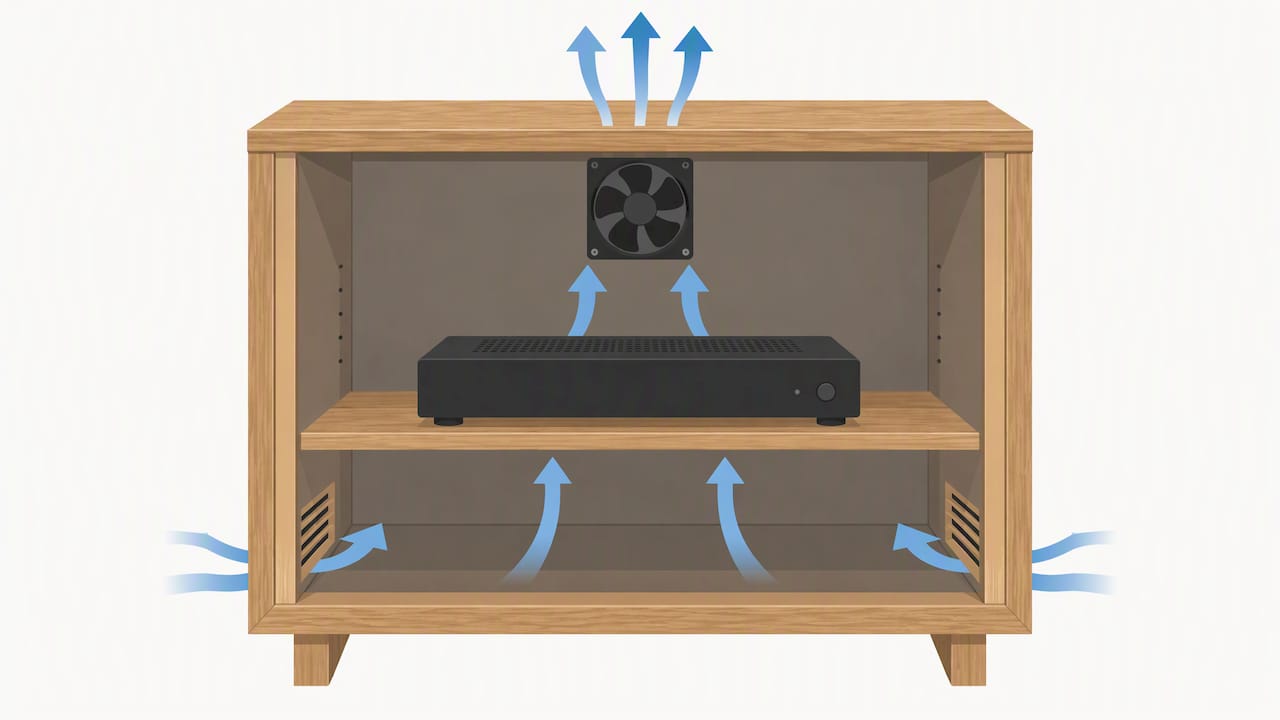
For furniture, computer-style fans can be a quiet option at low speed and fit neatly into a rear panel. Where dust is a problem, filtered fan modules designed for enclosures do the job. One example is a Finder 7F filter fan, a small model that provides 24 m³/h of filtered airflow and snaps into an enclosure cut-out. Larger industrial ranges, such as the ETA Enclosures cooling fans and filter fans, come in a wide spread of sizes and airflow rates and often run on 230V, which makes them more than a living room usually needs. A technical guide for enclosure fans notes that fan modules are rated in airflow and should be matched to the cabinet’s thermal load.
Practical installation points to keep in mind:
- Keep intake and exhaust at opposite ends of the cabinet so air crosses the devices.
- Cut the opening larger than the visible grille, because a decorative grille shows far more surface than it lets air through.
- Mount filters where you can reach them without emptying the cabinet.
- Leave a clear gap between the exhaust and the wall so hot air can escape into the room.
- Keep the fan away from the front, where it would blow warm air towards the sofa.
Pro Tip: Cut the opening to the size of the fan, then size the grille behind it generously: a pretty grille with a small cut-out will choke the airflow you just paid for.
How do you keep a ventilated cabinet quiet and clean?
A fan that you can hear over a film is a fan you will switch off, so noise is a design requirement, not an afterthought. Pick fans rated for continuous operation, since they are built to run for long periods without wearing out. Thermostatic or speed-controlled fans are even better: they idle quietly most of the time and ramp up only when the cabinet warms.
Dust is the other long-term problem. Filter-fan units stop dust reaching the electronics, but a filter that is hard to reach never gets cleaned, and a clogged filter chokes the airflow it was meant to protect. Design for service from the start:
- Choose fans rated for continuous duty, with a speed control or temperature sensor.
- Run fans at the lowest speed that holds temperatures steady, rather than at full speed all the time.
- Fit filter-fan units wherever dust is a worry, and make the filter removable without tools.
- Mount fans on soft rubber fixings to stop vibration travelling into the timber.
- Place the fan away from the listening position, ideally at the rear.
It is also worth knowing that mechanical ventilation in homes has noise implications of its own. The residential design guide on acoustics, ventilation and overheating notes that mechanical ventilation can affect internal noise, and the same thinking applies to a small cabinet fan in a quiet room. Choose fan speed and placement with that in mind.
How do you test that it works, and what if it does not?
You do not need special kit. A simple thermometer or the temperature readout on a console is enough to compare before and after. Follow this routine:
- Measure the room temperature and the temperature at each device’s air inlet and outlet before you change anything. This is your baseline.
- Run the equipment for a typical session so the cabinet reaches a steady state.
- Make your change, whether that is a new vent, a fan or a repositioned device.
- Re-measure at the inlets and the outlet under the same conditions.
- If temperatures are still high, check for a blocked exhaust, opposing airflows or cables stuffed across a vent.
- Fix what you find, then repeat the measurement until the numbers settle.
The usual remedies are simple. Add blanking panels over empty spaces so air is forced through the equipment instead of round it, a point the server cabinet airflow guidance makes about racks and that applies equally to a media unit. Reposition a device so its exhaust no longer blows into a neighbour. Step up to a larger fan, or add a second exhaust, if one cannot keep pace.
How do you keep the cabinet serviceable and tidy?
Good ventilation and good looks are not in conflict if you plan the access from the start. A cabinet you can open easily is a cabinet you will actually maintain.
- Fit a removable rear panel or a service door so you can reach the back of every device.
- Size cable openings with brush-style grommets, which let leads through while limiting air that bypasses the equipment.
- Dress cable bundles to one side and leave the manufacturer’s clearance around each device.
- Use blanking panels or filler boards on empty shelf spaces.
- Allow extra cut-out behind any decorative mesh, because the mesh itself reduces the free area.
Tangled cables are a surprisingly common cause of poor airflow, since a thick bundle across a vent acts like a blanket. Our guides to hiding and managing cables in a solid oak media unit and TV unit cable management fixes show how to clear those obstructions without losing the neat look.
Which materials and design features help natural ventilation?
Solid oak is a stable, dense timber, and that stability suits ventilation work: cut-outs hold their shape and fixings stay tight over years of heating and cooling. Open or slatted backs, perforated panels and slim recessed gaps behind the unit let air move without a visible vent. Open shelving between enclosed sections gives warm air a route upwards instead of trapping it under a solid lid.
Several design features do real work for convection:
- Raised plinths or feet that lift the base so cool air can enter underneath
- A rear gap between the cabinet and the wall, which creates an upward air channel
- Slatted or cane doors that stay breathable even when closed
- Shelves with cut-outs or notches at the back to let rising air pass through
- Open tops or a top vent strip, where warm air can leave
Painted finishes and veneered boards behave differently from solid timber, but the airflow rules are the same: openings matter more than the surface. When you browse ready-made options, look at how the back panel and shelf layout are built, not just the front. Pieces such as the Smoked Oak Tv Cabinet are a good starting point for a customised, ventilation-friendly design.
How do cabinet size and internal layout affect airflow?
A bigger cabinet is not automatically a cooler one. What counts is the volume of air available around each device and whether that air can circulate. A snug cabinet with a console wedged on a shelf leaves no room for convection, while a roomier one lets warm air rise and disperse before it recirculates.
Layout matters just as much as size. Put the hottest device at the top, where its heat rises out of the cabinet instead of passing over everything below. Keep a gap above and behind each box, matching the clearance in its manual. Avoid stacking boxes directly on top of one another, because the one underneath loses its top vent and the one above sits on a warm surface.
Empty compartments cause trouble too. Unused space acts as a bypass, letting air skip the equipment altogether, so fill spare shelf areas with a blanking board or move devices to close the gap. For corner setups, such as the Light Grey Painted Corner TV Cabinet, pay special attention to the rear, since a corner position can leave the back close to two walls and restrict the exhaust path.
Over time, good airflow supports the longevity and performance of the equipment inside. Cooler devices are less likely to throttle or shut down mid-session, and steady temperatures are kinder to components than repeated cycles of overheating.
Our view on building ventilation into bespoke oak TV units
Ventilation is easiest to get right at the design stage. When you order a bespoke TV unit from us, we can customise it to your requirements. We can discuss design details and practical requirements with you. Craftsmanship and customisation are what we do best, and a well-ventilated cabinet is simply good craftsmanship applied to a practical problem.
— Baby Love
How do you order a ventilated TV unit from us?

Start by measuring your equipment and listing every device, then get in touch to discuss your requirements. We can customise ready-made designs to suit your needs. Three pieces make good starting points:
- The Light Grey Painted Corner TV Cabinet for tight corners
- The Light Grey Painted TV Cabinet for a clean, flat-wall look
- The Smoked Oak Tv Cabinet for a darker, richer finish
To brief us properly, send your device list, the clearances from the manuals, and your preferred finishes. You can browse our full oak TV units and living room furniture to see the range before you decide.
FAQ
Do I need a fan in my media cabinet?
Not always. Low-heat devices such as routers and streaming boxes are usually fine with passive vents, while consoles and amplifiers under long use often need a fan. If temperatures stay high after you add vents, that is the sign to add active cooling.
Where should I put vents in a media cabinet?
Put intake vents low and exhaust vents high, so cool air enters at the bottom and warm air leaves at the top. This follows natural convection, as the guide to cabinet cooling methods describes for natural convection and filter-fan setups.
What size fan suits a TV cabinet?
Computer-style fans are a common choice, as they can move useful air at low, quiet speeds and fit in a rear panel. Pick one rated for continuous operation, and match its capacity to your heat load.
Can a fan make my cabinet worse?
Yes, if there is no exhaust path or the airflow opposes a device’s own fans. A fan only moves heat into the room, so the exhaust needs a clear route out and a source of cool replacement air.
Sources
- Servercabinets
- Four Ways to Cool an Enclosure Cabinet
- ACOUSTICS VENTILATION AND OVERHEATING Residential Design Guide
- Finder Climate Control Products7F2090241020 – Finder Filter Fan – Size 1 – Air volume 24m?/h. 24VAC – Control Components Anglia Limited